Modelio offers a feature to generate documentation from an ArchiMate model.
It relies on the Document Publisher module for the generation, with a specific documentation template.
Note : The Document Publisher module is required to generate the documentation.
Generation of the data processing registry
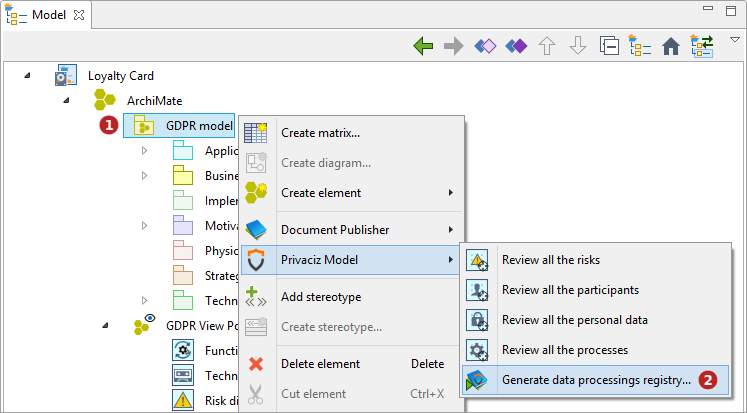
Steps:
-
Select the GDPR model root.
-
Launch the 'Privaciz Model\Generate data processings registry…' command.
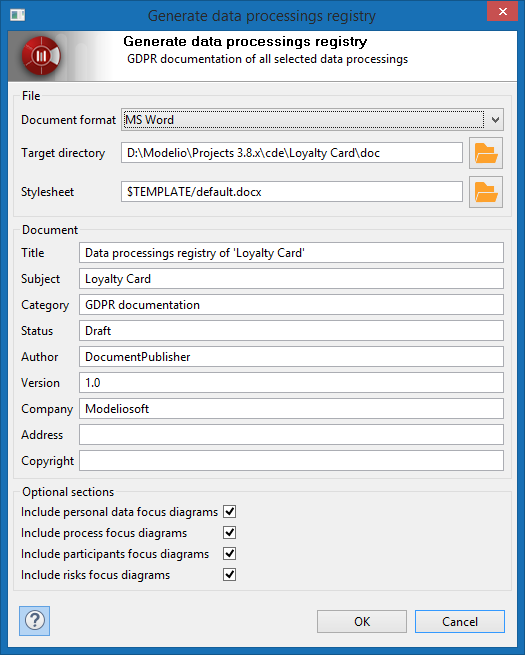
Steps:
-
Select the document format (MS Word, Libre Office or HTML).
-
Select the target directory.
-
Select the stylesheet.
-
Type in the document properties (Title, Subject, Category, etc.)
-
Select the focus diagrams to include.
-
Click on 'OK'.
Generated document
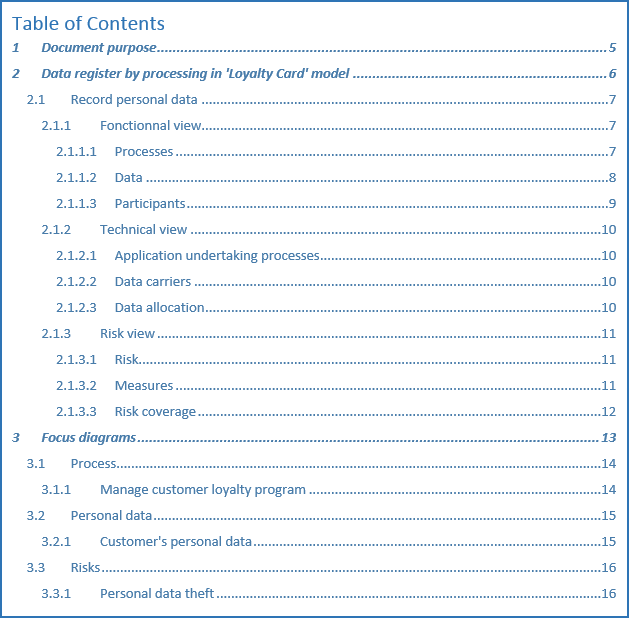
The generated document is composed of three sections:
-
The first one is a global description of the document.
-
The second one describe the data processings. Each processing is divided into three sub-sections:
-
The functional section documents the processes, data, and participants linked to the processing.
-
The technical section documents the applications and data carriers linked to the processing.
-
The risks section documents the risks and measures linked to the processing.
-
The third section lists the focus diagrams of the elements linked to the processings (this section is optional).